Automating Route 53 DNS Updates with Terraform When ALBs Are Reprovisioned
Overview
- YouTube Tutorial
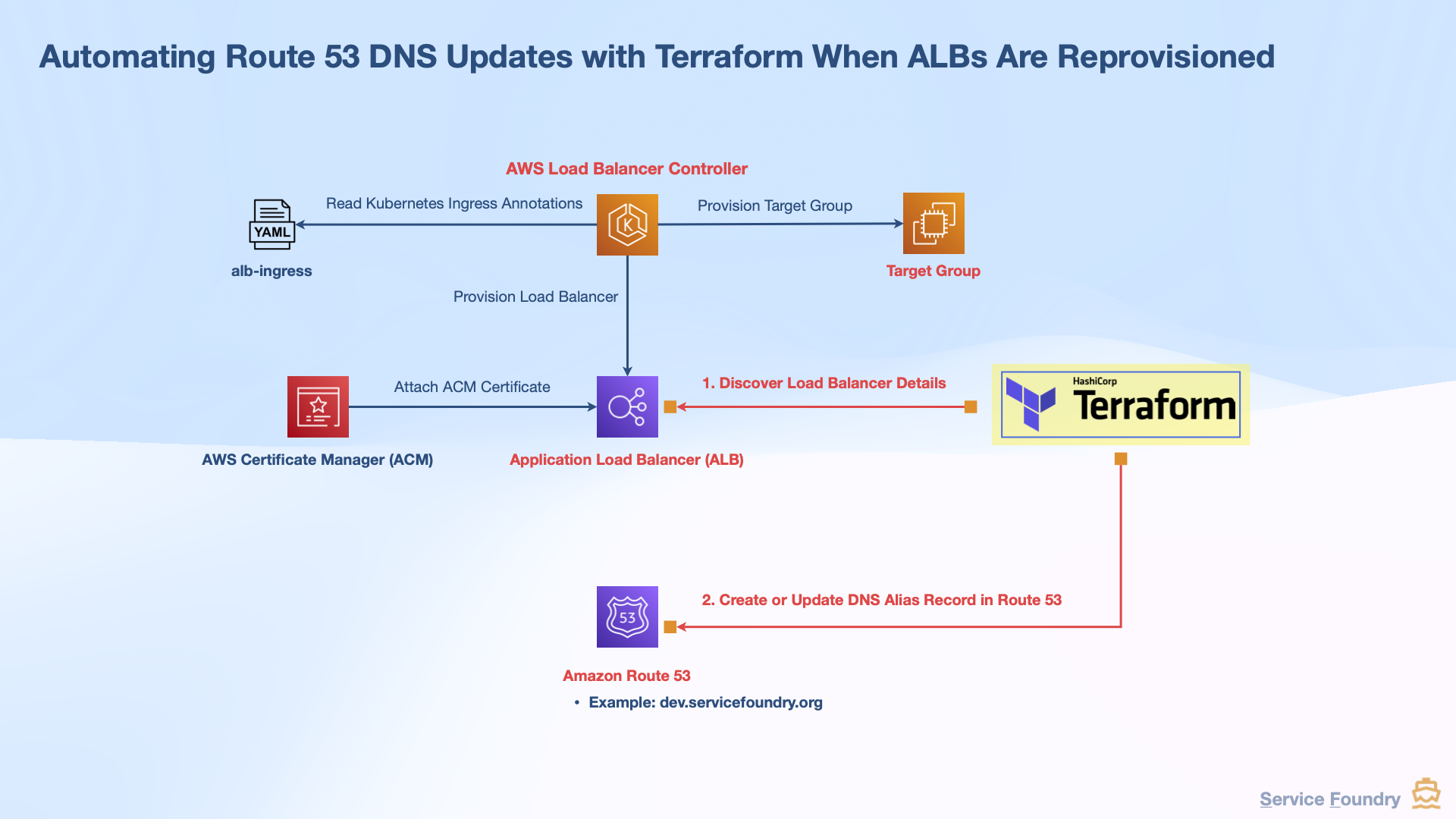
This guide shows how to automate the DNS update process in AWS Route 53 whenever a new Application Load Balancer (ALB) is created or replaced in a Kubernetes environment. It builds on the previous tutorial about securing web applications on Kubernetes with TLS using AWS Load Balancer Controller and Traefik.
When an ALB is deleted and recreated — such as during a cluster upgrade — the DNS record previously pointing to the old ALB becomes outdated. Manually updating this in Route 53 can be error-prone and repetitive. This guide demonstrates how to eliminate that manual step by automating it with Terraform.
- Previous tutorial video
-
Securing Web Apps on Kubernetes with TLS Using AWS Load Balancer Controller and Traefik
GitHub Repository
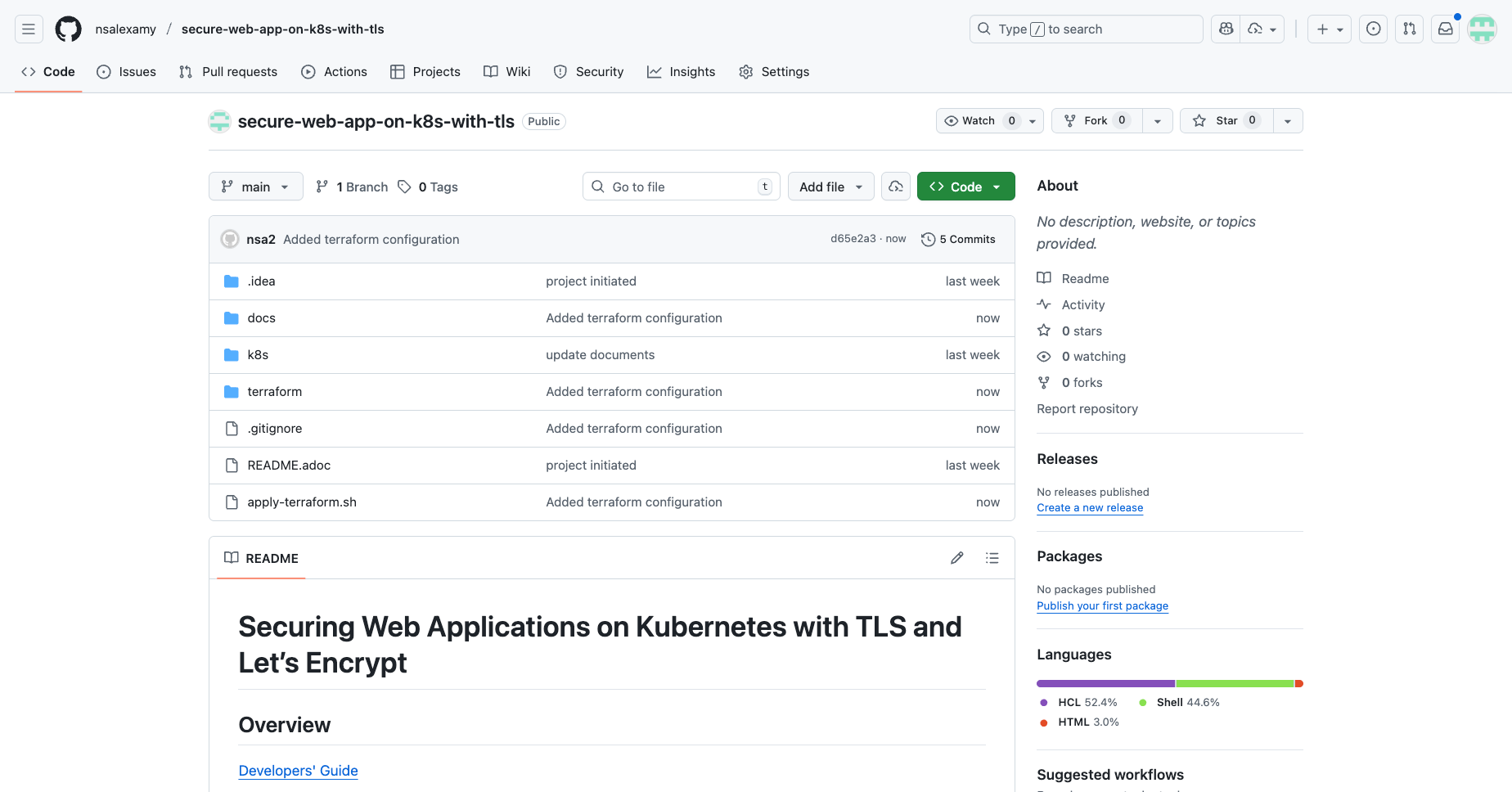
The complete source code and scripts are available on GitHub:
Script: apply-terraform.sh
This Bash script automates the following:
-
Waits for the ALB to become active using the AWS CLI.
-
Retrieves the correct Hosted Zone ID from Route 53.
-
Initializes Terraform.
-
Checks if a DNS record already exists.
-
If it exists, imports it into the Terraform state.
-
If not, Terraform will create a new one.
-
-
Applies the Terraform configuration.
#!/bin/bash

CWD=$(pwd)
TERRAFORM_DIR=$CWD/terraform

wait_for_alb_active() {
  # use aws cli to wait for alb to be active
  local alb_name="$1"
  local timeout_seconds="${2:-600}"     # default: 600 seconds
  local interval_seconds="${3:-5}"      # default: 5 seconds
  local max_retries=$((timeout_seconds / interval_seconds))
  echo "Waiting for ALB $alb_name to become active..."
  for ((i=1; i<=max_retries; i++)); do
    alb_state=$(aws elbv2 describe-load-balancers --names "$alb_name" --query 'LoadBalancers[0].State.Code' --output text 2>/dev/null || true)
    if [[ "$alb_state" == "active" ]]; then
      echo "ALB $alb_name is active."
      return 0
    fi
    sleep "$interval_seconds"
  done

  echo "Timed out waiting for ALB $alb_name to become active." >&2
  return 1
}
The code snippet below shows how to call the wait_for_alb_active function within the apply-terraform.sh script.
ALB_NAME="traefik-alb"

if ! wait_for_alb_active "$ALB_NAME"; then
  echo "Exiting due to timeout"
  exit 1
ficd $TERRAFORM_DIR
DNS_NAME=${DNS_NAME:-"servicefoundry.org"}
HOSTED_ZONE_ID=$(aws route53 list-hosted-zones-by-name --dns-name $DNS_NAME | yq '.HostedZones[0].Id' | awk -F'/' '{print $NF}')
# check if HOSTED_ZONE_ID is 'null'
if [ "$HOSTED_ZONE_ID" == "null" ] || [ -z "$HOSTED_ZONE_ID" ]; then
echo "Hosted Zone ID for $DNS_NAME not found."
echo "Please create a hosted zone for $DNS_NAME in Route 53 before applying this Terraform configuration."
exit 1
else
echo "Found Hosted Zone ID: $HOSTED_ZONE_ID for $DNS_NAME"
echo "Using existing hosted zone."
terraform init
# check if the DNS record exists
RECORD_SETS=$(aws route53 list-resource-record-sets \
--hosted-zone-id $HOSTED_ZONE_ID \
--output yaml \
--query "ResourceRecordSets[?Name == '${DNS_NAME}.' && Type == 'A']")
if [ "$RECORD_SETS" == "[]" ]; then
echo "DNS record for $DNS_NAME not found in hosted zone $HOSTED_ZONE_ID. It will be created."
else
echo "DNS record for $DNS_NAME found in hosted zone $HOSTED_ZONE_ID. Importing into Terraform state."
DNS_ALIAS="${HOSTED_ZONE_ID}_${DNS_NAME}_A"
echo "terraform import aws_route53_record.a_alias $DNS_ALIAS"
terraform import module.alias_for_traefik.aws_route53_record.a_alias $DNS_ALIAS
fi
terraform apply --auto-approve
fi
cd $CWDKey Highlights:
-
The wait_for_alb_active() function polls AWS until the ALB is in an “active” state.
-
Terraform is only applied once the ALB is verified to be ready.
-
DNS records are safely imported or created to reflect the current ALB.
Terraform Configuration
The Terraform configuration is organized as follows:
$ tree terraform
terraform
├── main.tf
└── modules
    └── route53-alias-for-k8s-lb
        ├── main.tf
        └── variables.tf
main.tf
main.tf sets up the AWS and Kubernetes providers and invokes the Route 53 alias module.
provider "aws" {
  region = "ca-central-1"
}

provider "kubernetes" {
  config_path = "~/.kube/config"
  # or host/token/cluster_ca_certificate if running in CI
}

module "alias_for_traefik" {
  source           = "./modules/route53-alias-for-k8s-lb"
  zone_name        = "servicefoundry.org"
  record_name      = "@"                     # root apex; use "app" for app.servicefoundry.org
  k8s_namespace    = "traefik"
  k8s_ingress_name = "traefik-alb"
  create_aaaa      = false
}
modules/route53-alias-for-k8s-lb/main.tf
modules/route53-alias-for-k8s-lb/main.tf dynamically locates the correct ALB using AWS tags and creates a Route 53 A record alias pointing to the ALB.
terraform {
  required_version = ">= 1.5.0"
  required_providers {
    aws = {
      source  = "hashicorp/aws"
      version = ">= 6.19.0"
    }
    kubernetes = {
      source  = "hashicorp/kubernetes"
      version = ">= 2.30.0"
    }
    external = {
      source  = "hashicorp/external"
      version = ">= 2.3"
    }
    null = {
      source  = "hashicorp/null"
      version = ">= 3.2"
    }
  }
}

############################
# Discover the AWS LB by controller tag (robust + gives us zone_id)
############################
# The AWS Load Balancer Controller tags LBs with:
#   servicefoundry.org/service-name = "<namespace>/<ingress-name>"
data "aws_lb" "this" {
  # Tag filter works well with controller-managed LBs
  tags = {
    "servicefoundry.org/service-name" = "${var.k8s_namespace}/${var.k8s_ingress_name}"
  }

}

############################
# Route53
############################
data "aws_route53_zone" "this" {
  name         = var.zone_name
  private_zone = false
}

locals {
  fqdn = var.record_name == "@" ? var.zone_name : "${var.record_name}.${var.zone_name}"
}

# A record → ALB/NLB Alias
resource "aws_route53_record" "a_alias" {
  zone_id = data.aws_route53_zone.this.zone_id
  name    = local.fqdn
  type    = "A"

  alias {
    name                   = data.aws_lb.this.dns_name
    zone_id                = data.aws_lb.this.zone_id
    evaluate_target_health = true
  }
}

############################
# Outputs
############################
output "lb_dns_name" {
  value       = data.aws_lb.this.dns_name
  description = "Discovered Load Balancer DNS name."
}


output "record_fqdn" {
  value       = local.fqdn
  description = "The fully-qualified DNS name created in Route53."
}
modules/route53-alias-for-k8s-lb/variables.tf
variables.tf defines all the required input values, such as the domain name, record name, namespace, and ingress name.
############################
# Variables
############################
variable "zone_name" {
  description = "Hosted zone name (e.g., servicefoundry.org). No trailing dot."
  type        = string
}

variable "record_name" {
  description = "Record label (e.g., '@', 'app', 'traefik')."
  type        = string
  default     = "@"
}

variable "k8s_namespace" {
  description = "Namespace of the Kubernetes Service (exposed by LB Controller)."
  type        = string
}

variable "k8s_ingress_name" {
  description = "Name of the Kubernetes Service."
  type        = string
}

variable "create_aaaa" {
  description = "Also create AAAA (IPv6) alias to the same LB."
  type        = bool
  default     = true
}
Kubernetes Ingress Configuration
To support the automation, your ALB Ingress should:
-
Use the alb ingress class.
-
Set AWS Load Balancer Controller annotations to:
-
Define the ALB name
-
Provide certificate ARN
-
Configure tags used by Terraform to discover the ALB
Make sure the tag servicefoundry.org/service-name matches the expected format so Terraform can find the right load balancer.
apiVersion: networking.k8s.io/v1
kind: Ingress
metadata:
  name: traefik-alb
  namespace: traefik
  annotations:
    alb.ingress.kubernetes.io/load-balancer-name: traefik-alb
    alb.ingress.kubernetes.io/scheme: internet-facing
    alb.ingress.kubernetes.io/tags: "servicefoundry.org/service-name=traefik/traefik-alb,servicefoundry.org/provider=service-foundry"
    alb.ingress.kubernetes.io/target-type: instance     # or "ip"
    alb.ingress.kubernetes.io/healthcheck-path: /ping
    alb.ingress.kubernetes.io/healthcheck-port: '31080'
    alb.ingress.kubernetes.io/listen-ports: '[{"HTTPS":443}]'
    alb.ingress.kubernetes.io/certificate-arn: arn:aws:acm:aws-region:aws-account-id:certificate/certificate-arn
spec:
  ingressClassName: alb
  ## rules are omitted for brevity
Automation Flow
-
Deploy the ALB Ingress resource:
$ kubectl apply -f k8s/alb-traefik/ingress-traefik-alb.yaml-
Run the automation script:
$ ./apply-terraform.sh
-
Terraform will either:
-
Import the existing DNS record and update it
-
Or create a new DNS record pointing to the new ALB
-
Verify DNS Changes
You can verify the updated DNS using:
$ dig +short servicefoundry.orgMake sure the IP address or CNAME matches the newly created ALB.
Conclusion
By integrating Terraform into your DNS management workflow, you eliminate manual Route 53 updates when ALBs are reprovisioned. This ensures your domain always points to the right infrastructure and reduces human error during cluster updates or rollouts.
This approach not only simplifies maintenance but also ensures high availability and reliability in production environments.
📘 View the web version:
Additional Resources
-
AWS Load Balancer Controller Documentation: https://kubernetes-sigs.github.io/aws-load-balancer-controller/latest/
-
Terraform AWS Provider: https://registry.terraform.io/providers/hashicorp/aws/latest/docs
-
Terraform Kubernetes Provider: https://registry.terraform.io/providers/hashicorp/kubernetes/latest/docs
-
AWS Route 53 Documentation: https://docs.aws.amazon.com/Route53/latest/DeveloperGuide/Welcome.html